Unternehmensprofil
bei Google löschen!
Google löscht Ihr Unternehmensprofil nicht. Wir schon. Empfohlen von der Anwaltskanzlei Hechler Negative Google Bewertung löschen
„Kosten nur bei Erfolg“ - Das Remoovo®-Prinzip


How to delete a Google Business Profile the right way
We remove your business from Google Maps
Removing and deleting the Google Business Profile can work in many cases. Remoovo has developed a process with a high success rate to delete Google Business Profiles once and for all.
There are various reasons for having a Google Business Profile (formerly Google My Business) deleted. These include, for example:
- Discontinuation or closure of a business
- Business acquisition or fresh start with new valuations
- Duplicate business profile
- Disable the review function and stop receiving Google reviews.
This process is not 100% guaranteed to remove your listing from Search and Maps, but it’s the most proven process we have come across after years of hands-on experience and experimentation.


„In most cases, the business can be removed from Google.“
- Complete removal of the Google Business Profile
- Profile no longer appears on Maps
- Reviews are no longer possible.
* The deletion is carried out solely on a technical level..
Deleting a Google Business Profile: Step-by-Step Deletion Process
Step 1:
Submit your Google Business Profile to us.
To delete the Google Business Profile, we verify whether the requirements for deletion are met.
Step 2:
Finally, an end to annoying reviews.
In many cases, it is possible to completely remove your Google My Business listing. Of course, no one can guarantee this. It is also often possible to delete listings in other European Union countries or worldwide. As a rule, the removal process is very quick (provided it succeeds).

3 good reasons to remove your Google My Business profile
No more Google reviews
Deleting your Google Business Profile means your business can no longer be reviewed on Google Maps.
Not only "permanently closed"
Once the Business Profile is removed, a misleading "Permanently closed" notice will not be displayed.
Regain control over
your reputation
Completely deleting the Google Maps listing prevents all types of reviews on Google Maps in the future.
Finally: No more reviews on Google Maps!
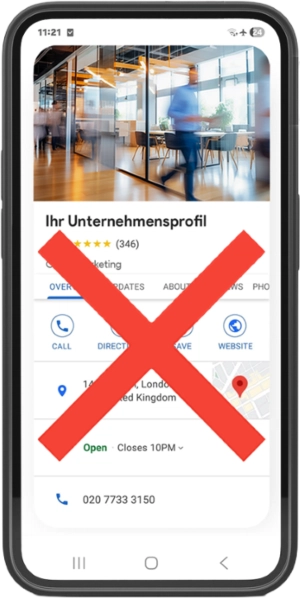
disappears
completely
If the deletion is successful: All data associated with the Maps profile will be permanently deleted. The profile will no longer appear in Google Search or Google Maps, and the option to leave reviews will be disabled.
Your website, your reviews on other portals, or your Google ranking will not be affected by the deletion of the company profile.
Permanently remove Google Business Profile:
Why you should do this?

„Free yourself from Google reviews.!“
Reason 1: You no longer want to be evaluated.
The Google Business Profile (formerly Google My Business) is inextricably linked to the review function. It is impossible to maintain a Google Business Profile without being constantly subject to reviews. Many businesses find dealing with unfair—and often foolish or unjustified—criticism extremely stressful. With Remoovo’s service, you can often have your entire Google Business Profile removed, ensuring that you can no longer receive reviews in the future.
Reason 2: You do not rely on local discoverability.
You do not need a Google Business Profile to operate successfully. If your business is booming and you operate beyond the local area, you do not actually need a Google listing where just anyone feels compelled to leave a review. In that case, you can even do without positive reviews.
Reason 3: You have taken over a company.
Anyone who has taken over a business (e.g., a restaurant) is often confronted with negative reviews left for their predecessor. Since these reviews have absolutely nothing to do with the new operator, the business owner can get rid of them by completely removing the Google Business Profile and creating a new one.
Contact for free consultation
That’s Not the Way to Do It – Online Guides That Usually Don’t Work
„There are very often ways to completely delete the company profile..“
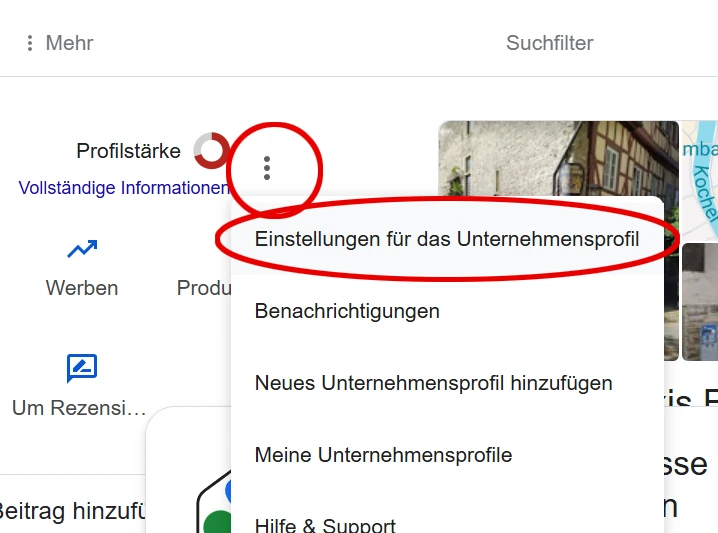
You can also delete a Google Business Profile yourself (theoretically) in just a few steps. Proceed as follows:
1. Sign in with the Google account linked to the Business Profile. Click the Google Business icon (blue house).
2. Open Settings: Click on the three dots icon (More) and select Business Profile settings.
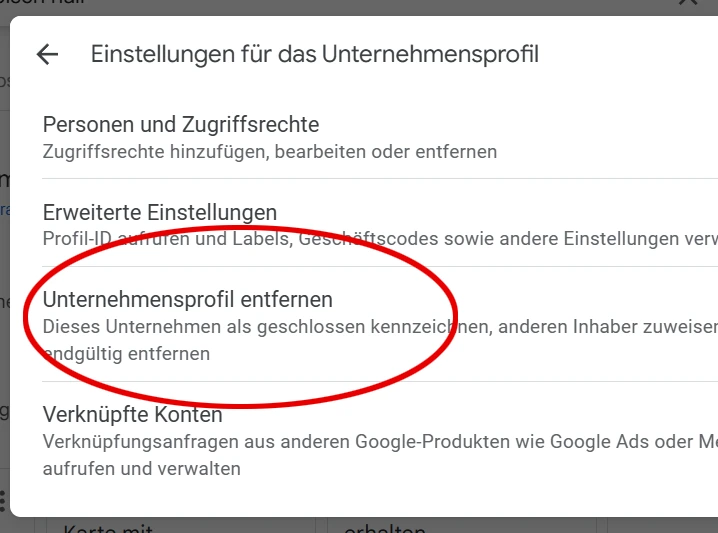
3. In the next step, click the "Remove company profile" option.
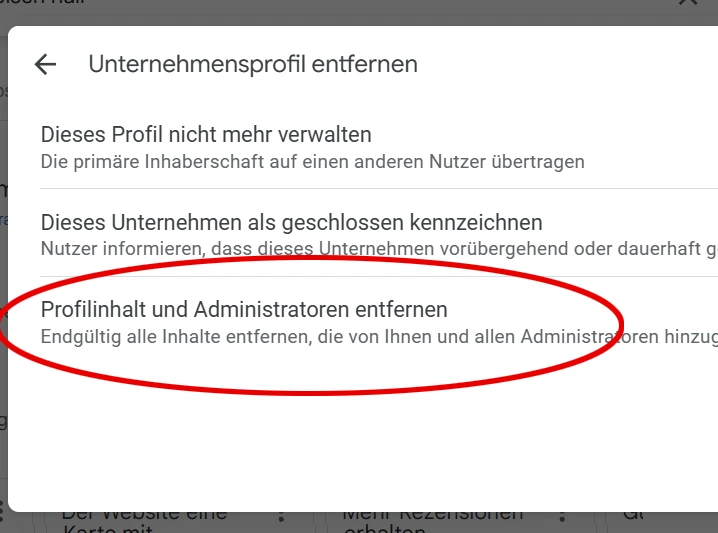
4. Then click on Profile Content and Remove Administrators.
5. Google will now inform you about the consequences of this step. Click "Next".”.
6. Confirm that you want to remove all content and administrators associated with the company profile. Confirm this by selecting "Remove." You have now deleted the company profile from your Google profile.
Please note: This action merely deletes or disconnects the Business Profile from your Google account. It does not result in the removal of the Business Profile from Google Maps. Instead, you lose ownership and can no longer make changes; the core profile—or the framework of the Google Maps listing—remains in place for the time being.
This method can work if you first set the business to "permanently closed." Complete deletion by Google can take several months; unfortunately, the "permanently closed" notice remains visible if you have activated it. The process can be faster if the business no longer exists, as Google often deletes the business profile very quickly in such cases.
Frequently Asked Questions
Can any company profile be deleted?
A distinction is made between complete deletion and simply removing the profile from one’s Google account. The latter is always possible, but it means losing the ability to edit the profile. In reality, however, it is usually possible to have the business listing completely removed (technically speaking). There are cases where this does not work because certain prerequisites are no longer met.
How long does the deletion process take?
Complete removal usually takes a maximum of 24 hours; sometimes, it happens within as little as two hours. That is, of course, assuming the deletion actually works—something for which there is no guarantee.
With the following procedures, the business listing remains visible to everyone:
1. Mark the business as "permanently closed." This setting simply leads customers to believe that your business no longer exists at all. However, the Google My Business listing—or Business Profile—will still appear in Google search results.
2. "Remove Google Business Profile from account." This leaves the listing intact, and you merely lose editing rights. In this case, there is even a risk that third parties could take over your business profile.
What are the costs for deleting the company profile?
Removal costs just €299 with Remoovo, and this price includes a repeat removal should the profile reappear within one year of deletion (a very rare occurrence).
Will the Google Maps listing also be deleted?
Completely removing your Google Business Profile causes your business listing to disappear from local Google Maps lists and specific Google Maps search results. No one will be able to find you on Google Maps anymore, but they also won’t be able to leave reviews.
Can the My Business profile reappear?
In very rare cases, the company listing reappears because someone has submitted a request to Google to that effect. We do not know exactly how this happens. It also happens that older, overwritten listings become visible again if the current Business Profile is deleted. However, this is usually not a problem, as the (very) old listing can generally be removed as well.
Do all the reviews disappear as well?
When the company profile is deleted, all data, photos, and information—including all reviews—disappear. Furthermore, it will no longer be possible to leave new reviews in the future, as the review function will no longer exist.
Is there a difference between "permanently closed" and deleting (permanently)?
Yes, the difference is significant. After all, many companies that have their business listing deleted continue to operate and have not actually closed down. Marking a business as "permanently closed" is usually the most customer-friendly approach when the business has genuinely ceased operations.
- Permanently closed: The business listing remains on Google Maps but displays a "Permanently closed" notice. This is useful when a business has ceased operations, as it keeps customers informed. However, the notice is detrimental if the company is still active, as it misleads customers and may cause them to take their business elsewhere.
- Permanent deletion: The goal of our work is the complete removal of the entry, leaving absolutely nothing there—and specifically not the word "permanently." geschlossen“
If I select "Stop managing this profile," will the business listing disappear as well?
No. If you take this route, you simply lose control over the business listing and can no longer manage it or make changes to it.
Is it possible that my company cannot be deleted?
In most cases, we can delete the Business Profile (formerly Google My Business). However, there are occasional profiles that are more difficult to remove—often due to a high volume of reviews or the specific industry (for instance, in our experience, Google sometimes presents challenges with medical practices). Consequently, there is no guarantee that the Google Business Profile can actually be deleted; that is why we do not advertise claims like "it works 99% of the time" or offer a guarantee—doing so would be both incorrect and misleading.
Is "Remove profile content and administrators" sufficient to delete the company listing?
No. Even with this step, there is no guarantee that Google will completely delete the Business Profile. If it is removed at all, it usually remains visible for many weeks—or even months. If you attempt to remove your business yourself by following standard online instructions, typically only the data and photos you personally uploaded will disappear. What does *not* disappear are the reviews and the option for users to leave reviews; the profile remains discoverable in its basic structure, stripped of any custom details.
Is it also possible to deactivate a business profile that is set to "permanently closed"?
Yes, even if others—or you yourself—have set your business profile to "permanently closed" and you no longer have access rights, the profile can usually still be deleted.
Does deactivating the business listing affect my website or anything else?
Removing the entire Business Profile has no impact on your website or on reviews or listings on other platforms.
Video on the topic: Deleting your Google Business Profile
In this video, you will learn how Remoovo’s service can help you completely remove your Google Business Profile so that no one can leave reviews for you on Google Maps in the future.
Practical tip: The more changes you make to the company profile, the harder it may become to have it removed. You can achieve truly permanent deletion using our proven method; while it usually works, naturally no one can guarantee success.
Fees: Since we offer a purely success-based fee, you bear no risk.
Worldwide service – feel free to contact us!!
„Constant unfair evaluations can be stressful. Free yourself from them..“
If you would like to have your Google Business Profile deleted—rather than simply relinquishing management of it—please feel free to contact us for a free initial consultation. We can quickly assess the options for removing the listing. We can also assist you in creating a new business profile.