Remove your business
profile from Google!
Google won’t delete your business profile. We will. Recommended by the Hechler law firm Cost: € 249,00 upon deletion
„No win - no fee“ - The Remoovo®-Principle



How to Delete Your Google Business Profile – How it Really Works (2026)
How to completely remove your Google My Business listing
Would you like to delete your Google Business Profile? Then the first thing to know is that Google distinguishes between several different actions: removing the profile from your own Google account, marking it as „permanently closed“, and requesting removal from Google Search and Google Maps. Our guide explains why „permanently closed“ is not the same as deletion – and how it really works.
The key facts at a glance:
- Deleting it yourself is barely possible: There is no „delete profile“ button that lets you remove the business profile at the touch of a button.
- Permanently closed: „Closed“ ≠ deleted: your listing still appears in Google Search and Google Maps.
- The only reliable route: complete removal of the profile through a specific procedure.
- Professional help: Remoovo usually removes the profile and all its listings within 24–48 hours – you only pay once we succeed.

Who created the profile in the first place?
Many of the businesses that contact us did not create their profile themselves and do not administer it either. That is no coincidence, because in a great many cases a Google Business Profile is not created by the owner at all, but by Google itself or by third parties. And that is precisely why it is so difficult to get rid of the profile later on without outside help. There are three different ways in which a business profile can come into existence.
Route 1: a Google user created the profile
Any Google user can create a listing by tapping an empty space or an address in the Maps app and then clicking on „Add a missing place“. Creating a profile this way is apparently straightforward, although Google does not publish every profile unchecked. Before publication, Google carries out a plausibility check to establish whether
- the user is in the vicinity of the address entered
- a business with a similar or identical name already exists at that location
- the business registered exists at all (website, etc.)
This route should not be underestimated: it opens the door for unwelcome competitors to create a listing for a rival business and fill it with negative entries.
Route 2: from data found on the internet
What we have observed for years is that Google creates business profiles of its own accord – without the consent or permission of the business concerned. Google is a data octopus whose declared aim is to collect all the data available on the internet and make it available to internet users. That includes a realistic representation of the world on Google Maps. To this end, Google analyses all data about businesses (e.g. name, address, contact details, website) and builds a profile from it.
Route 3: imports from official registers
But Google does not only trawl official websites; in its search for data it also draws on the commercial register and other trade databases. On top of that, data from business directories, the Yellow Pages or telephone directories feed into the analysis.
Can you delete a Google Business Profile yourself?
You can indeed remove a profile from your own Google account. To do so, you use the „Remove profile content and admins“ button. However, this does not have the effect you intend, namely that the public listing disappears from Google Maps and Google Search.
All you delete this way is the content you added yourself, along with your administration rights for the account. After removal, the profile itself remains visible in Google Search and on Google Maps.
The reason: Google wants to keep the profile for its users as part of the real world. That is why there is no button saying „Permanently remove this listing and all reviews“.
If your goal is „the listing should no longer be visible to customers“, removing it from your own account is not enough.
Read Google’s official instructions on removing a Business Profile

Deleting a Google Business Profile: the three cases you need to tell apart

1. You no longer want to manage the profile
In this case you can simply remove the business profile from your Google account. Doing so means you lose the ability to manage it. The public listing, however, remains in place and visible.
2. Your business has closed permanently
If your business genuinely no longer exists, you can mark it on Google as permanently closed. Even then, though, the listing stays visible in Search and on Maps for months, if not years.
3. The public listing is to be removed entirely
If you want to remove the listing completely because it is a duplicate or incorrect, you can request removal from Google Search and Google Maps. Google sets out specific requirements for the removal of a Business Profile. This is usually where businesses despair and the DIY route comes to an end. And this is where Remoovo comes in.
„Permanently closed“ is not the same as „deleted“
Make sure you distinguish between the status „permanently closed“ and genuine deletion of the profile:
What really happens when a business is „closed“:
When a business is marked as permanently closed, the listing is still visible on Google Maps and in Google Search. All users then see is a note saying that the business has closed for good.
If you want to tell the public that your business has closed for good, this status is the right solution. But if your business continues to trade and you simply want to remove the Google Maps listing so that people can no longer review you, this is the wrong route. Here is how to mark your business as permanently closed.
Step-by-step guide: how it (does not) work
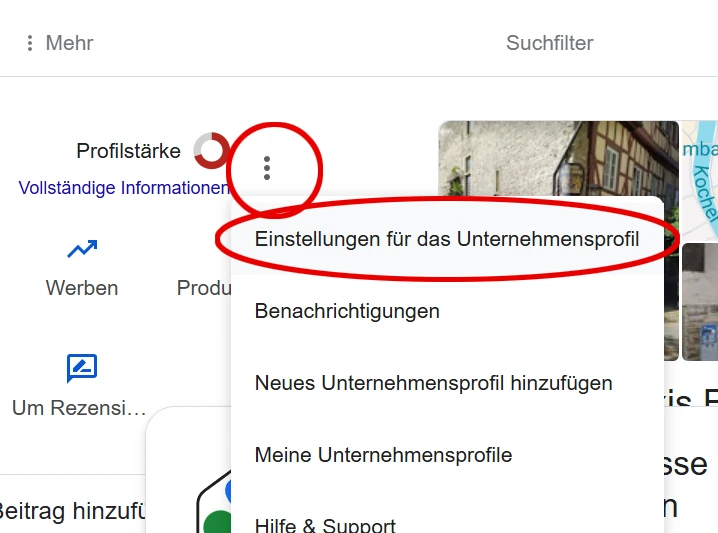
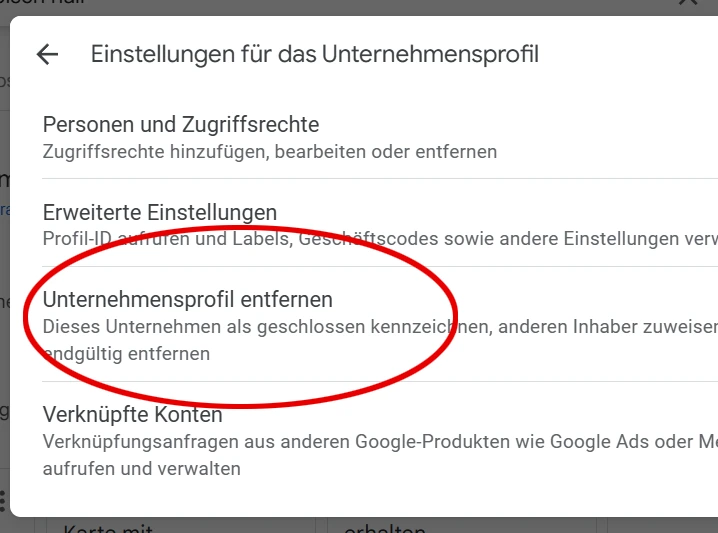
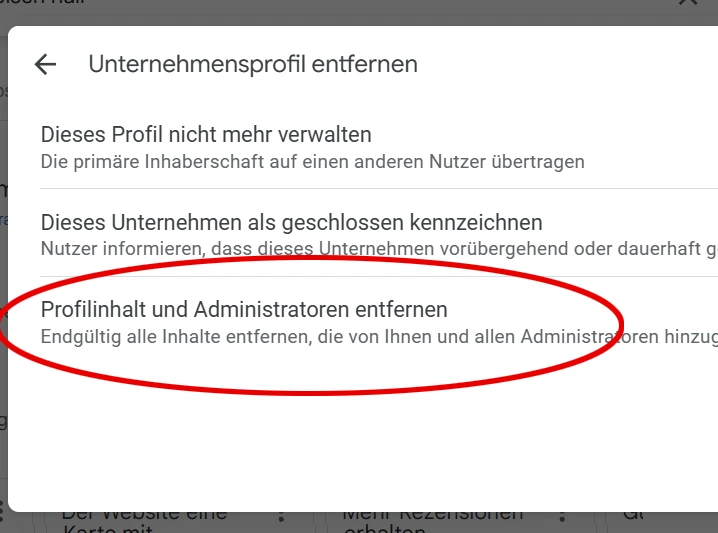
In theory, deleting a Google Business Profile can also be done yourself in just a few steps. Proceed as follows:
1. Sign in with the Google account that is linked to the business profile. Click on the Google business icon (the blue house).
2. In the top right you will find a vertical three-dot menu; click on Business Profile settings.
3. In the next step, click on the option Remove Business Profile.
4. Then click on Remove profile content and admins.
5. Google now explains the consequences of this step. Click on „Continue”.
6. Confirm that you want to remove all content and admins from the business profile. Confirm with „Remove“. You have now deleted the business profile from your Google account.
Please note: What you have done so far is delete the business profile from your Google account, or rather disconnect it. This does not yet mean the Business Profile is deleted from Google Maps. What it does mean is that you lose ownership and can no longer make any changes. The core profile – the framework of the Google Maps listing – initially remains in place.
This method can work if you first set the business to "permanently closed". Complete deletion by Google can take several months, and unfortunately the "permanently closed" note remains in place if you have activated it. It can be quicker if the business no longer exists. In that case Google often deletes the business profile very quickly.
Deleting a Google Business Profile: how it actually works!
"Free of that Google business listing at last!"
Step 1:
Send us your Google business listing
In order to delete the Google Business Profile, we check whether the requirements for deletion are met.
Step 2:
An end to tiresome criticism at last
In many cases, complete removal of your Google My Business listing is possible. Naturally, nobody can guarantee it. It is often possible to delete listings in other European Union countries or worldwide as well. As a rule, removal happens very quickly (when it works).

Removing a Google Business Profile for good:
what are the reasons for doing so?

Reason 1: you no longer want to be reviewed
The Google Business Profile (formerly Google My Business) is inseparably tied to the review function. You cannot run a Google Business Profile without constantly being open to reviews. For many businesses, the constant need to deal with unfair – and often foolish, unjustified – criticism is a major source of stress. With Remoovo’s service you can very often have the entire Google Business Profile removed, so that nobody can review you in future.
Reason 2: you do not depend on local visibility
You do not need a Google Business Profile to run a successful business. If your business is thriving and you operate beyond your local area, you really do not need a Google listing on which anyone and everyone feels entitled to review you.
Reason 3: you have taken over a business
Anyone who has taken over a business (a restaurant, for example) is often confronted with their predecessor’s negative entries. As these have nothing whatsoever to do with the new operator, the owner can rid themselves of the old negative entries by completely removing the Google Business Profile and creating a new one.
Get in touch now, with no obligation
FAQ: frequently asked questions on this topic
Can every business profile be deleted?
A distinction is drawn between complete deletion and removing the profile from your own Google profile. The latter always works, but all you lose is the ability to edit the profile. In most cases it is in fact possible to have the business listing removed (technically) in full. There are cases where it does not work because certain requirements are no longer met.
How long does the deletion process take?
Complete removal usually takes a maximum of 24 hours; sometimes the removal takes effect within as little as 2 hours. Assuming, of course, that the deletion works at all, for which there is no guarantee.
With the following approaches, the business listing remains visible to everyone:
1. Marking the business as „permanently closed“. All this setting achieves is to make customers think your business no longer exists at all. The Google My Business listing, or business profile, however, continues to be shown in Google’s search results.
2. „Removing the Google Business Profile from your account“. The listing remains in place and all you lose are your editing rights. In this case there is even a risk that strangers take over your business profile.
What does it cost to delete a business profile?
Removal costs just EUR 249.00 at Remoovo, and that price includes a further removal should the profile reappear within one year of deletion (which happens only very rarely).
Is the Google Maps listing deleted as well?
Complete removal of the Google Business Profile means your business listing disappears from the local Google Maps list and from the dedicated Google Maps search results. Nobody can find you on Google Maps any more – but by the same token, nobody can review you either.
Can the My Business profile reappear?
In very rare cases the business listing reappears because somebody applies to Google for it. Exactly how this happens is not known to us. It also happens that older, overwritten listings become visible again when the current Business Profile is deleted. This is usually not a problem, however, because as a rule the (very) old listing can be removed too.
Does that mean all reviews are gone too?
When the business profile is deleted, all data, photos and information disappear along with every review. No new reviews are possible in future either, because the review function no longer exists.
Is there a difference between „permanently closed“ and (permanent) deletion?
Yes, the difference is considerable. Many businesses that have their listing deleted continue to exist and are precisely not closed. „Permanently closed“ is usually the most customer-friendly route if the business really has ceased trading.
- Permanently closed: the business listing remains on Google Maps, but with the note „Permanently closed“. That makes sense when a business ceases trading, so that customers are informed. The note is damaging if the business continues to trade, because customers are then misled and may well go elsewhere.
- Permanent deletion: the aim of our work is complete removal of the listing, after which there is nothing left at all – in particular no „permanently closed“ note.
If I select „stop managing this profile“, does the business listing disappear too?
No. If you take this route, all you lose is control over the business listing: you can no longer manage it or make any changes to it.
Is it possible that my business cannot be deleted?
In most cases we are able to delete the business profile or Google My Business listing (as it used to be called). Every now and then there are profiles that are harder to delete; this can be down to a very large number of reviews or to the sector involved (in our experience, for example, Google sometimes causes difficulties with medical practices). So there is no guarantee that the Google Business Profile can actually be deleted, which is why we do not advertise with claims such as "works in 99% of cases" or, worse still, with a guarantee – that would be not only untrue but misleading.
Is „remove profile content and admins“ enough to delete the business listing?
No. With this step, too, it is never certain whether Google will delete the Business Profile in full. If it does at all, the listing usually stays in place for many more weeks and possibly months. If you try to remove your business yourself by following the usual deletion guides on the internet, as a rule only the data and photos you published there yourself will disappear. What does not disappear: the reviews and the option to leave reviews. The profile remains findable in its basic structure, without your individual customisations.
Can a business profile that is set to "permanently closed" also be deactivated?
Yes. Even if you or somebody else has set your business profile to "permanently closed" and you no longer have access rights, the profile can usually still be deleted.
Does deactivating the business listing affect my website or anything else?
Removing the entire Business Profile has no effect on your website or on reviews and listings on other platforms.
Our video on the topic: deleting a Google Business Profile
In this video you will learn how Remoovo’s service can help you remove your Google Business Profile completely, so that nobody can review you on Google Maps in future.
Practical tip: The more changes you make to the business profile, the harder it can become to have the profile removed. Genuinely permanent deletion can be achieved with our tried-and-tested method; it works in most cases, though of course nobody can guarantee it.
Costs: because we work purely on a success fee basis, you take no risk.
Help across the country – do get in touch!
„Constant unfair reviews can weigh you down. Free yourself from them.“
If you would like to have your Google Business Profile deleted rather than merely give up managing it, do get in touch for a free initial consultation. We can assess fairly quickly what the chances are of making the listing disappear. We are also happy to help you set up a new business profile.